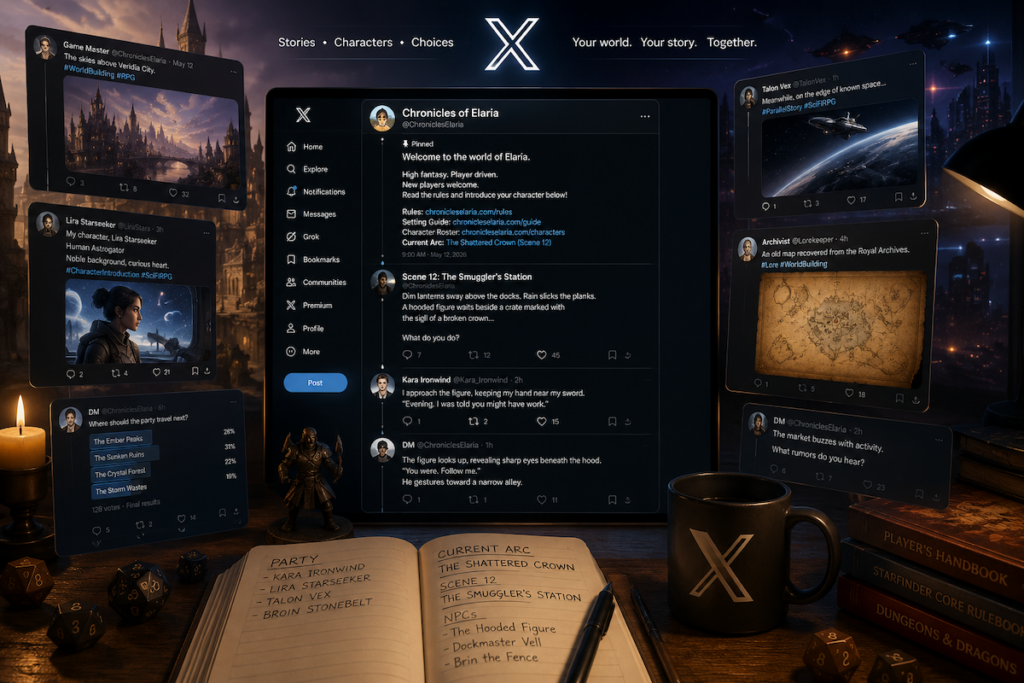
X is a solid platform for running a realtime, text based RPG using pretty much any system.
I’ll be talking about it in general terms here, but you can plug in D&D, OSR, narrative systems, whatever you are already comfortable with.
What matters is the structure, not the ruleset.
What you are actually building here
Before anything else, it helps to understand what this setup is doing.
You are basically turning X into a lightweight play by post table.
Players post actions when they have time. You respond when you have time. The game lives inside threads, replies, and a bit of structure you maintain on top.
It is not fast, but it is flexible. That is the tradeoff.
First thing I recommend, make a dedicated account
Do not run this from your personal account if you are serious about it.
Set up a separate account for the game.
This gives you:
A clean place for all game content
Less noise from unrelated posts
Easier onboarding for new players
Better control over structure
Once that is done, lock in your basic identity. Name it clearly. Make it obvious what it is for.
People should know what it is within 5 seconds of landing on it.
Set your visibility before you do anything else
This part matters more than people think.
You have two real options:
Public game
Anyone can see and potentially join.
Good for open tables and community games.
Protected game
Only approved followers can see and interact.
Good for private campaigns or invite only groups.
Protected accounts are useful, but they change how interaction works, so decide early and stick with it.
Once the game starts, changing this will cause confusion.
Set reply rules on every post
This is one of the most important modern X features for running RPGs.
Every post lets you control who can reply.
You will see options like:
Everyone
Only people you follow
Only mentioned accounts
I recommend using this deliberately instead of leaving it random.
For example:
Exploration scenes: everyone can reply
Combat rounds: only tagged players
NPC interactions: controlled replies to avoid clutter
This becomes your main way of managing turn order.
Your pinned post is your whole game front door
This is the one thing I always tell people not to rush.
Your pinned post should include:
What the game is
How people join
Who is currently playing
Link to the current scene
Basic rules or expectations
Where character sheets live
Think of it like your “table sign” plus your rulebook plus your session recap all in one place.
If someone cannot understand your game from that post, they are not going to join.
Set up your basic structure threads early
Do not wait until the game gets messy.
I recommend setting these up before session 1:
General hub
This is your out of character space.
Players use it for questions, jokes, coordination, whatever.
Character thread
All player characters go here.
Keep it pinned or easy to find.
NPC thread
Each NPC gets a dedicated post.
This becomes your reference point so players can always “go talk to Bob” without confusion.
Scene index
This is just a running list of scenes in order.
Link forward and backward between scenes.
It keeps everything from turning into a scroll nightmare later.
One scene = one thread
This is the core rule that keeps everything stable.
Each location or situation gets its own thread.
You post:
A short setup
The situation
What is immediately happening
Then players respond inside that thread.
When the scene ends, you stop using it and move on to a new one.
Do not reuse old scene threads for new locations. It gets messy fast.
Combat needs a decision upfront
You need to decide how you want combat to behave before it shows up.
There are two ways I recommend:
Inline combat
Fight happens inside the scene thread.
Good for short encounters.
Separate combat thread
Fight branches into its own thread.
Good for anything with multiple rounds or complicated positioning.
If you are unsure, just split it out. It keeps things readable.
Dice rolling setup
Pick one method and stick with it.
I usually recommend one of these:
Players roll externally and post results
GM rolls publicly and posts outcomes
Simple narrative resolution (no dice at all)
You can use dice bots, but I would not build your whole system around them.
Keep it simple. Keep it visible.
Expect replies not to behave perfectly
This is something you need to design around, not ignore.
Replies can:
Show up out of order
Be hidden under “more replies”
Be ranked differently for different users
Be surfaced inconsistently in threads
So do not assume everyone sees everything.
As the GM, you will need to:
Restate key actions
Summarize the current situation often
Keep a clear “what is happening right now” line in active scenes
That one habit saves most games from falling apart.
Set expectations for response timing
Before the game starts, tell players how pacing works.
Things like:
How often you post updates
How long players have to respond
What happens if someone is inactive
If you do not set this early, the game will stall constantly or feel inconsistent.
Final setup checklist
Before you run your first scene, make sure:
Dedicated account is ready
Public or protected mode is decided
Reply rules are understood
Pinned post is complete and readable
Scene, NPC, and character threads exist
Combat rules are decided
Dice method is chosen
Players know the pacing expectations
If all of that is in place, you are good to start.
If not, fix it first. It gets harder once the game is live.
That is basically the setup.
It looks like a lot written out like this, but in practice it is just a handful of repeating patterns. Once you run a couple of scenes, it becomes second nature.